
ERP vs WMS: Nine Signs Your Module Isn’t Coping | Socius24
ERP Warehouse Module Bingo (How Full Is Your Card?)
There’s a very common conversation that has happened in many a boardroom, in some form or another, in almost every business that runs a warehouse. Operations brings up the fact that they need some sort of automation and optimisation if they’re going to keep up with the competition, and possibilities begin to be put onto the table. The CFO immediately points out that the shiny new ERP that was recently installed already includes a warehouse module. The IT director nods, sagely. The procurement team likes the idea of just the one vendor and one licence.
And the operations director, who knows in their bones that this is very likely to end in tears, struggles to explain exactly why that is in a language that the rest of the room understands.
This article is our attempt to help with that conversation.
ERP warehouse modules aren’t bad, by the way.
They’re just designed for a different job than running a real distribution operation. They grew out of inventory accounting, which is a thing, but it isn’t the same thing as fulfilment. Telling you what you have and where it is in the building is great, if that’s all you need. Choreographing the kind of physical movements that will get it out of the door at peak speed, in the right sequence, with the right labels, onto the right vehicle, with the right paperwork, at the right time, is something completely different.
Most major ERPs (SAP, Oracle, Microsoft Dynamics, NetSuite, Infor etc.) will pitch you their warehouse module. The pitch is usually some version of “well, you already own it, you just have to turn it on. So, why would you buy a separate WMS?” And that kind of pitch tends to land particularly well with CFOs and IT directors, who typically like the idea of one single point of contact. Conversely, it lands rather less well with the warehouse manager, who tends to know a lot of very specific things that the boardroom doesn’t.
So, in the spirit of helping operations directors everywhere more easily communicate what they already know, here’s a little game for you to play. Below are nine things that your ERP module will probably (maybe) do, eventually, kind of, if you squint a bit and the moon is in the ascendant. Tick off the ones that you recognise from your own implementation. A full house could be ruinous. A single line is usually deeply concerning. Two squares is reasonably normal. Zero squares means either you don’t have an ERP warehouse module, or you do and you haven’t noticed any of this yet.
Give it a minute…
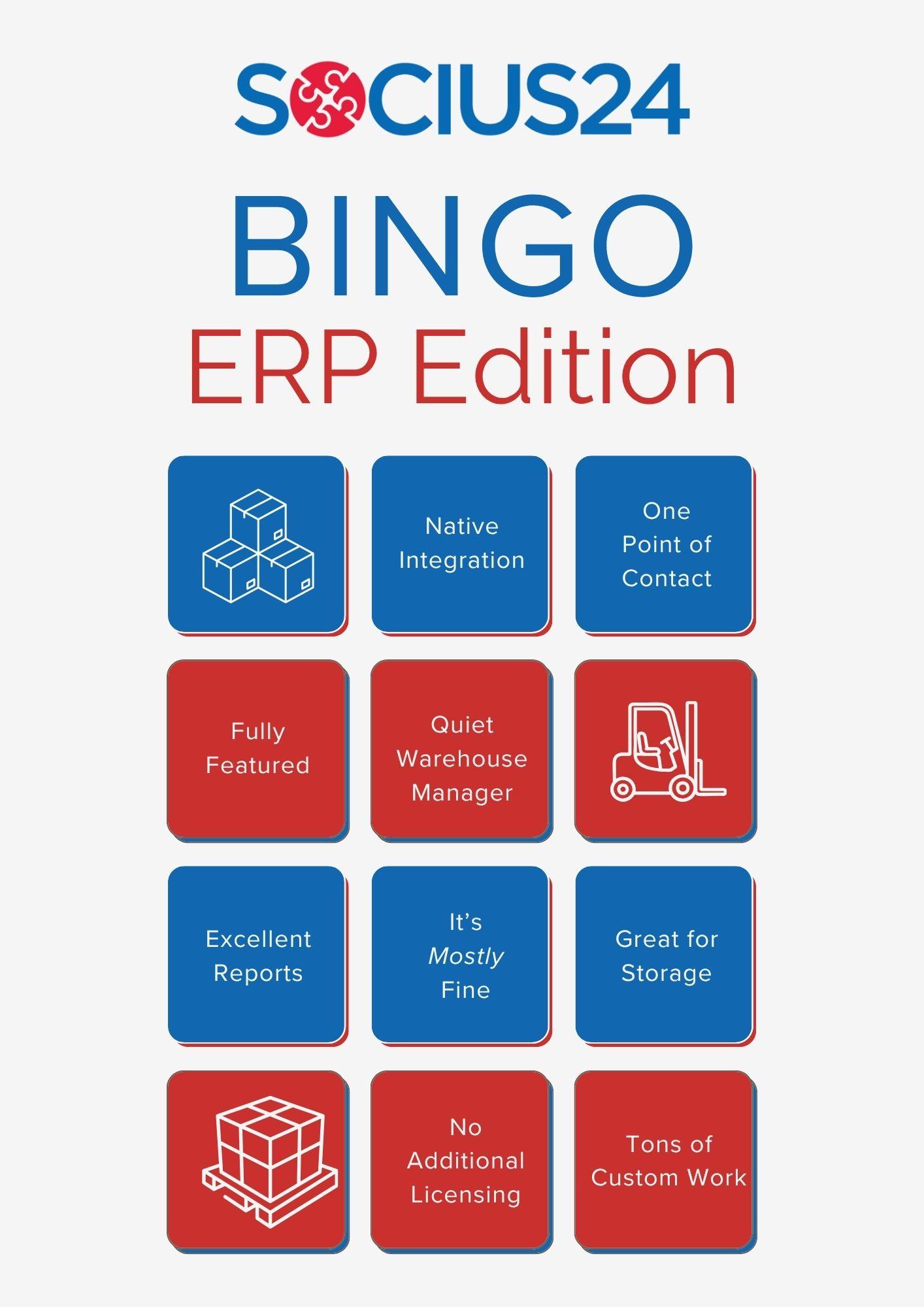
How many did you get?
Square 1: “Native integration” means that it integrates beautifully… with itself.
Your ERP module talks to your ERP beautifully. It talks to your Pickers, your AMRs, your scanners and your customer’s ASN portal rather less beautifully.
Which means that if you’re fixed on using that ERP, you’re going to be paying integrators either way. You’ll just be paying them to make your ERP module talk to everything else, rather than paying them to make a specialist WMS talk to the ERP. Which is a much shorter conversation with far fewer surprises in it.
Bonus points, by the way, if you choose a WMS like Dispatcher WMS, which has already been frequently integrated with most of the big ERPs in the market. And also if you choose a WMS consultancy firm that knows what they are doing, like Socius24.
Square 2: “Fully featured” turned out to mean that those features do exist. Kinda.
The ERP module has a directed putaway function. Which means that it definitely ticks the box on your feature matrix. Whether it actually directs putaway in a way that survives first contact with a real day in a real warehouse is a slightly different question, and the answer tends to reveal itself somewhere around month four of go-live, when all of your bulk locations have started acting a bit funky (technical term), and nobody can quite work out why.
Square 3: The module was designed for storage. But you do fulfilment.
One of these things is not like the other. Storage is about knowing what you have and where it is, and ERPs are pretty good at that. Fulfilment is about the physical bit of getting it out the door in the best, most efficient and effective way. Which is what specialist WMS platforms are excellent at. Asking an ERP warehouse module to do fulfilment is a bit like asking a really good accountant to drive a forklift. They might manage it. You probably wouldn’t want to be on the warehouse floor while they do.
Square 4: The “no additional licensing” statement was (technically) true.
But the implementation cost wasn’t included. Nor was the customisation cost. Nor was the eighteen-month project to make the module do what something like Dispatcher WMS does out of the box. That CFO who originally championed the no-additional-licensing concept is now asking, with increasing urgency, why the warehouse project keeps coming back for yet more budget.
Square 5: One point of contact can be one point of contact that doesn’t always respond on your timescale.
When something goes wrong in your warehouse module, support tickets often go into the same queue as the finance module tickets, the HR module tickets and the procurement module tickets. The vendor’s expertise and support will always be focused on the part that makes the vendor most of its revenue. And that, a bit of real talk here, is rarely warehousing. Eventually, you will probably still end up needing a warehouse specialist. You’ll just need one who has to work around an ERP module rather than simply configure a system that was built for the job.
Square 6: The reports are excellent. They’re just not the reports your warehouse needs.
The ERP’s reporting layer is seriously impressive when it comes to financial reporting, inventory valuation and aged stock analysis. It’s less impressive at telling a shift supervisor at 11 am which orders are at risk of missing today’s cut-off, broken down by zone, possibly combined with the affected customers ranked by penalty exposure. That’s a different category of question altogether, and the answer is typically “ask IT for a custom report”.
Square 7: Customisations have started to outweigh standard functionality.
Every time the warehouse needed something that your ERP module didn’t do natively, someone built around it. A bolt-on here, a workflow modification there, a screen layout that nobody quite remembers commissioning, etc. Three years in, the module is doing the job, more or less, but despite a desperate and growing need to do so, nobody wants to upgrade, because upgrading means revisiting every customisation, and nobody is entirely sure what some of them do anymore.
It’s software Jenga, and quite sensibly, no-one wants to be the person to knock it over.
Square 8: Your warehouse manager has stopped raising it in meetings.
This is the most serious square on the card, and possibly the most expensive one. Your warehouse manager has raised this issue repeatedly for the last eighteen months. They have a bulky folder, full of lots of very comprehensive examples. That folder is no longer getting updated, because nothing in it ever changed anything for anyone. They’ve now moved into the next phase of their project, which is to silently work around the system, while possibly looking for a new job. Everything is fine until they leave, at which point their workarounds will leave with them.
Square 9: It’s mostly fine, actually. Just so long as nothing (at ALL) changes.
The module works perfectly well for the operation as it existed at go-live. SKU profile, channel mix, customer compliance regime, peak shape, returns volume, automation integration etc. All of them are exactly the same as the day that the project was signed off. Should any of those business aspects change significantly, things may need to be revisited. Should several of them change at once, things may need to be revisited rather more immediately.
Counting up the squares
- Zero squares. Either you don’t have an ERP warehouse module, or you do and you’re perhaps less than three months in. Or it could just be that you’re extraordinarily lucky. Come back in a year and maybe buy a lottery ticket, quick smart. The Gods seem to be on your side.
- One or two squares. Totally normal. Every warehouse system has some sort of friction. The question is whether the friction is constant background noise, or if it’s starting to affect your operation.
- Three or four squares. It’s worth having a serious conversation about whether your ERP module is the right home for your warehouse execution going forward. Or if, instead, the warehouse would be better served by a specialist platform with which the ERP can easily integrate.
- Five or more squares. Yeah, you didn’t need our bingo card to tell you what’s going on. The question isn’t whether to act, it’s how soon and in what order. We can help you with that.
- Full house. We’re so sorry. And also, please get in touch.
The actual question
Underneath the bingo card, there’s a real question that’s absolutely worth asking. And it isn’t “should we use the ERP module or a specialist WMS”. It’s “is our warehouse an IT cost centre that we want to minimise, or is it a competitive advantage that we want to maximise?”
Both questions are valid. The first one points to the ERP module, and that’s fine for businesses where warehouse operations truly aren’t a differentiator. The second one points to a specialist WMS. And that’s because warehouses that compete on speed, accuracy or service level need software that was built to do that specific job.
The big mistake isn’t choosing one over the other, it’s choosing the first option while expecting the kind of results you’d get from the second.
Dispatcher WMS is the answer to the second question.
It’s a specialist platform that integrates cleanly with all the major ERPs, so the boardroom still gets its single source of truth at the finance and inventory level, while at the same time, the warehouse gets a system that actually understands what it’s being asked to do. If you want to take that functionality even further, User Services Portal (USP) and AskUSP (our natural language AI layer) add the visibility and plain-English access to your operational data that ERP reporting layers don’t really deliver. And our technical partnership with Optioryx means that their Pulse product can add the kind of AI pick-path optimisation that ERP modules aren’t being updated to include, and probably won’t be for a while.
If you’ve ticked three or more squares in your bingo card and you want to do something about it, we’re always happy to chat. Book an obligation-free discovery call now.
FAQ: ERP vs WMS
ERP warehouse modules grew out of software that was designed for inventory accounting: they’re built to tell you what you have and where it is. A specialist WMS, in contrast, is built for fulfilment: choreographing the physical movements that get stock out of the door in the right sequence, with the right labels, onto the right vehicle, at the right time. Related jobs, but very different ones.
It depends on one question: is your warehouse an IT cost centre to minimise, or a competitive advantage to maximise? If warehouse operations truly aren’t a differentiator for your business, the ERP module can be fine. If you compete on speed, accuracy or service level, you need software built for that job, integrated with the ERP rather than replaced by it.
The licence is often technically free; however, the total cost rarely is. Implementation, customisation, integration with scanners and automation, and the huge project of making the module do what a specialist WMS does out of the box are all sat on top of the “no additional licensing” line. Many operations end up paying integrators either way; the question is what they’re paying them to build around.
Yes. Dispatcher WMS has been integrated with most of the major ERPs in the market many times over, so the boardroom keeps its single source of truth at the finance and inventory level while the warehouse runs on a system built for execution. Integrating a specialist WMS with an ERP is typically a shorter, far more-trodden project than making an ERP module talk to warehouse hardware.
Request a Demo Now
If you’ve enjoyed this article, subscribe for free to our weekly Newsletter
– The World of WMS –
for more of the same great information!