
The Mobile App – Mobile access to Dispatcher WMS via USP
Home » The Mobile App – Mobile access to Dispatcher WMS via USP
Productivity Tools · Via USP
Take Blue Yonder Dispatcher WMS further
Now it works OUTSIDE the warehouse too
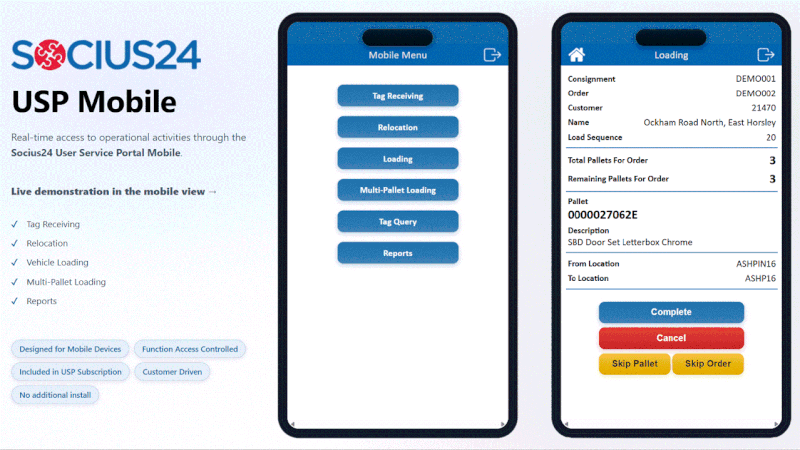
Mobile access to Dispatcher WMS, delivered through our User Services Portal (USP), so that your drivers, service partners and remote teams can update and read live WMS data from any device, anywhere.
5x Blue Yonder EMEA Selling Partner of the Year
2014 - 2017 - 2020 - 2021 - 2022
Built on the platform you already run,
extended by the team that helped build it
0 +
Projects Completed
0 +
Successful Implementations
0
Countries Supported
0 x
BY Selling Partner of the Year
Your WMS stops at the warehouse door,
but your operation doesn't.
Dispatcher WMS is built for the four walls of the warehouse. And it does a fantastic job. But the moment that your goods leave the dock – onto a third-party carrier, a sub-contracted route, a remote depot – the live data usually disappears with them.
The Challenges
No visibility after shipping
Once an order ships, status updates in your WMS just stop. Items are assumed delivered unless they come back – and that means that planners are blind to what’s actually happening on the road.
Manual partner communication
If instructions to third-party service partners are passed by phone and email, and then keyed back into the system by hand, it’s slow, and an easy place for manual errors to creep in.
No last-minute flexibility
Once orders are shipped, moving them between routes or reacting to a shortage means using manual workarounds rather than a system action.
Locked to fixed equipment
Traditional WMS access often assumes a warehouse RDT. Partners on different kit, or staff out on the floor, can be left out.
What the USP Mobile gives you instead
Live Dispatcher WMS data, in the palm of every hand
USP extends Dispatcher WMS to any internet-connected device – no special hardware required. Each user sees only what they need, so the experience stays simple and secure, even out in the field.
The Solution
1
End-to-end traceability
Real-time post-shipping updates track every order from warehouse to doorstep – and back again for Returns – so that your planners keep full visibility and control.
2
Self-service for partners
Third-party carriers and service partners read orders, update statuses and run reports themselves — cutting the phone calls and manual re-keying.
3
Dynamic route adjustments
Merge delivery types and move orders between routes after shipping, so planning stays responsive to last-minute change without a separate planning tool.
4
Receive, cross-dock & load
Receive multiple pallets at once, cross-dock them straight to delivery vehicles, and then load with structured checking – all designed to minimise scanning.
5
Runs on any device
Tablet, phone or browser – USP works on any equipment that can reach the internet, so partners can use the kit they already have.
6
Your branding, your view
Customise the look and feel to match your corporate branding, and show each user only the functions relevant to their role for minimal training.
How we deliver it
USP Mobile WMS access is configured for your operation, not the other way round.
Our usual approach:
Workshop & prototype
We map the exact field workflows that you’ll need, then prototype against them so that you can see and shape the solution before build.
Build & configure in USP
We develop the mobile functionality on USP, fully integrated with your Dispatcher WMS, using a staggered release so that you’ll get value early.
Train & roll out
Straightforward training and a role-based interface keep onboarding short. We scale across sites as you grow.
How this looks in practice
From a recent rollout with a UK two-person home delivery specialist:
Five sites
Rolled out across five depots, scaling with the business
Fewer calls
Partners self-serve instead of phoning the hub with queries
Real-time visibility
Full order visibility maintained even after goods leave the depot
What our Customers say
“Post-implementation, our carriers don't need to pick up the phone and speak to the hub if they have a question. It's reduced queries and the time taken to answer them.”
– Operations lead, UK two-person home delivery specialist
Is USP mobile right for you?
This might be a fit if...
✓ You run Blue Yonder Dispatcher WMS and need to extend it beyond the warehouse.
✓ You work with third-party carriers or sub-contracted service partners who need limited, controlled, and secure WMS access.
✓ You’re losing visibility of orders once they ship, and want real-time status end to end.
✓ Your teams are out on the floor or on the road, not just tied to a fixed RDT.
✓ You’d rather extend the system you have than buy a separate planning or tracking tool.
FAQ
No. Access is through User Services Portal (USP) via web browser, so there’s nothing for partners to download. It runs on any internet-connected tablet, phone or laptop.
Yes. USP is built specifically to extend Blue Yonder Dispatcher WMS and is fully integrated with it. Updates made in the field flow directly back into the WMS in real time.
Yes. Each user role sees only the functions and data relevant to them, so you give partners controlled, contained access – rather than visibility over the full system.
The interface is deliberately simple and role-based, and can be branded to match your business – both of which keep onboarding short.
Yes. We typically use a staggered rollout, proving it on one workflow or site before scaling across the network as you grow.
Ready to take your WMS mobile?

SOCIUS24
Subscribe to our Newsletter.
© 2026 Socius24 Limited | Company Registered in England and Wales 08389688 | Privacy Policy